Under constructionStatus: Building. Being built now. Parts may run; the whole is not finished.
Every project’s status →01.10Terminal interface
VOX Torch: a terminal view over AI agent work
VOX Torch is AR Labs' terminal interface over its live task graph: portfolio, line of work, single task, what waits on a person, and the agents running.
VOX Torch is AR Labs' terminal orchestrator: a terminal interface for seeing all of our work and the AI agents doing it from one screen. An AI agent is a language model run in a loop with tools, so it can act as well as reply. Torch reads our task graph and the records of running Claude Code sessions, and lets a person move from the whole portfolio down to a single task and back, see everything waiting on them, and see which agents are running. It exists because, without it, the only way to know what an agent is doing is to find its terminal window. Torch is the first surface of VOX OS, our design for an operating layer over agent work, and the place where we test orchestration ideas before they move into our browser canvas, Vox Canvas. It is for engineers supervising several coding agents at once.
What it does
We track work in Beads, Steve Yegge's open-source issue tracker for coding agents. Each tracked task is a bead, and beads form a tree with dependency edges between them; all the tasks and their dependencies make up the task graph. A thread in Torch is one line of work: a bead marked as a thread, plus everything beneath it. Each Torch screen is one level of zoom over that tree.
| Screen | Shows | State |
|---|---|---|
| Portfolio | Every thread on one line: progress, counts by whose turn it is, the next action and the agent on it | Built |
| Thread | One line of work: its intent, then a Board grouped by whose turn it is, a Tree of the hierarchy, and a Sequence tab | Built |
| Sequence | A kanban for the thread: a column per phase (yours, next and ready, working, waiting, done, not sequenced, parked), cards in recommended order with NEXT marked | Built |
| Item | One task: its chain of intent from the root down, its blockers, and an evidence box pairing each claim in its spec with the proof it names | Built |
| Needs you | Everything waiting on the person across all threads | Built |
| Agents | Claude Code and tmux sessions on this machine | Built for one machine |
| Queue | Three lanes: work an agent can take, work waiting on a person, work not yet ready | Designed |
The screens nest: the Portfolio opens onto a thread and a thread onto a single item, while Needs you and Agents cut across every thread.
flowchart LR
  T["VOX Torch"]
  PF["Portfolio"]
  TH["Thread and sequenced kanban"]
  IT["Item: intent and evidence"]
  NY["Needs you"]
  AG["Agents"]
  T --> PF --> TH --> IT
  T --> NY
  T --> AG
Screens
The screenshots below are Torch's own exports: Textual, the framework Torch is written in, can save any screen as an image of the terminal. They were taken on 13 November 2026 against live data, with the portfolio set to three threads that hold the lab's own tooling work: Torch itself, Taskgraph and Vox Canvas's map.
Torch opens on the Portfolio. Each thread is one row: a progress bar of finished against all items, counts by whose turn it is, and the next action. j and k (or the arrow keys) move the cursor, Enter opens a thread, n jumps to Needs you, a to Agents and r reloads.

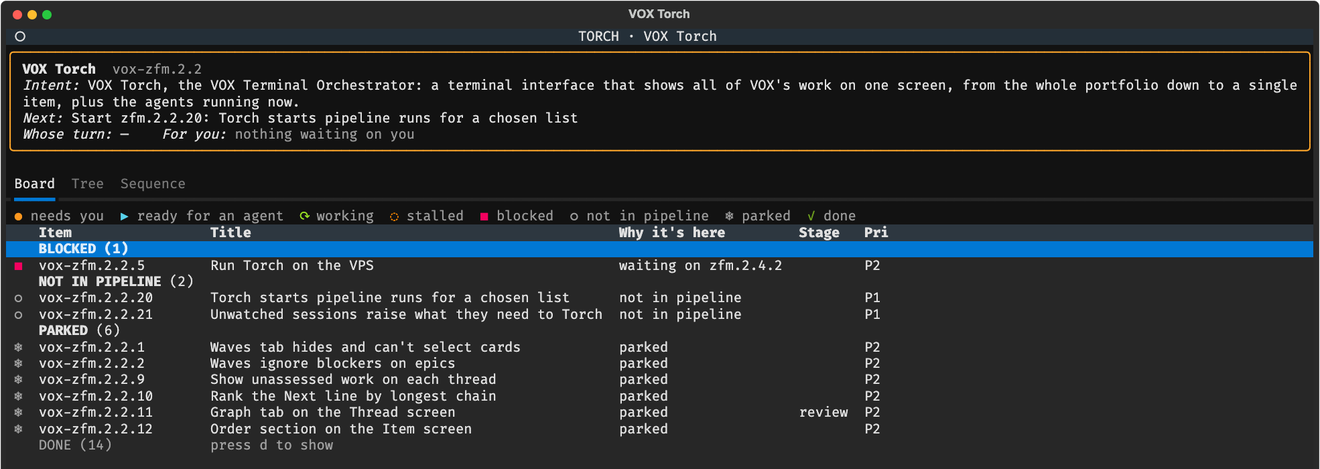
Opening a thread shows a header that stays in place: the thread's intent, the one item to start next, whose turn it is, and the first thing waiting for you. Beneath it are three tabs. b opens the Board, which groups the thread's items by whose turn it is and says why each item is where it is; a one-line key names every glyph. t opens the Tree, the bead hierarchy with closed items included, and h and l step between tabs.
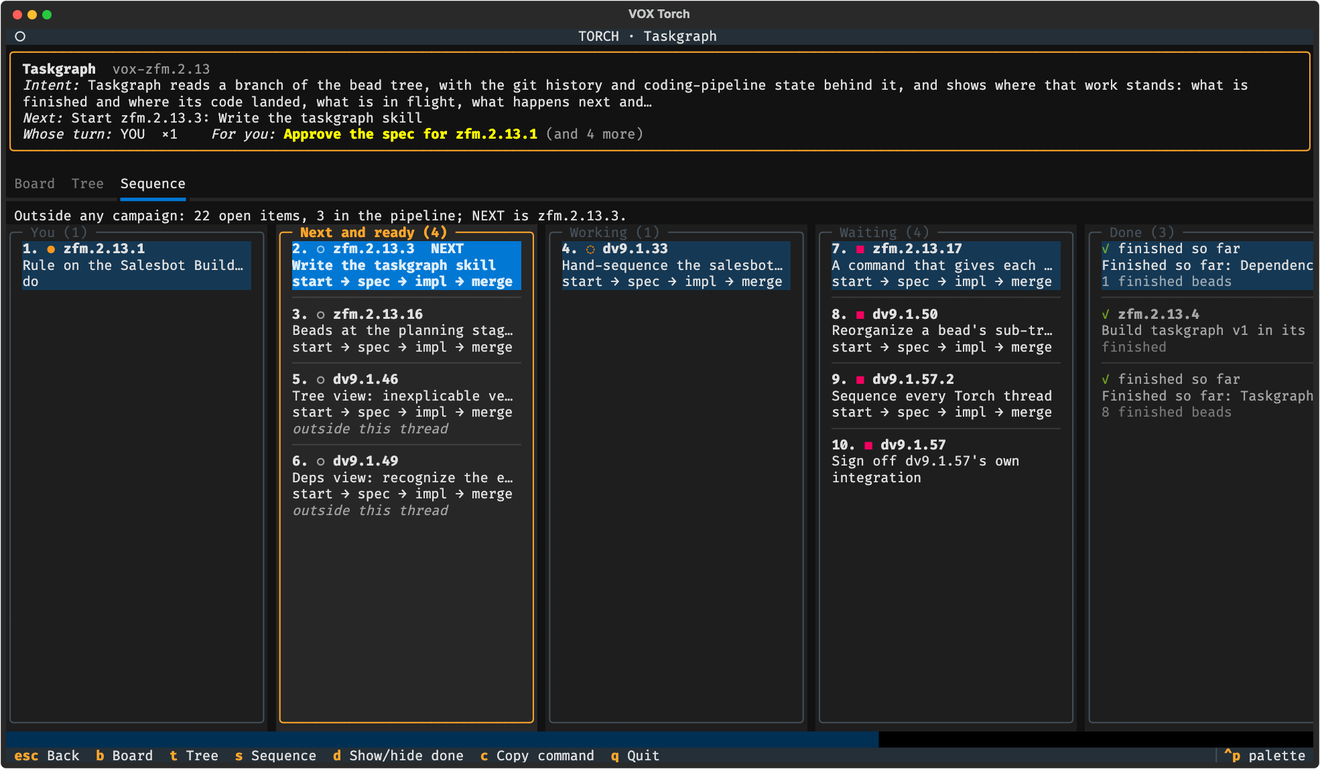
s opens the Sequence tab, the thread's kanban as Taskgraph orders it. Each column is a phase (You, Next and ready, Working, Waiting, Done, then work not yet sequenced and work parked), cards carry Taskgraph's step numbers with NEXT marked, and each card shows the stops still ahead of it in the pipeline. Left and Right move between columns, and Enter opens a card.
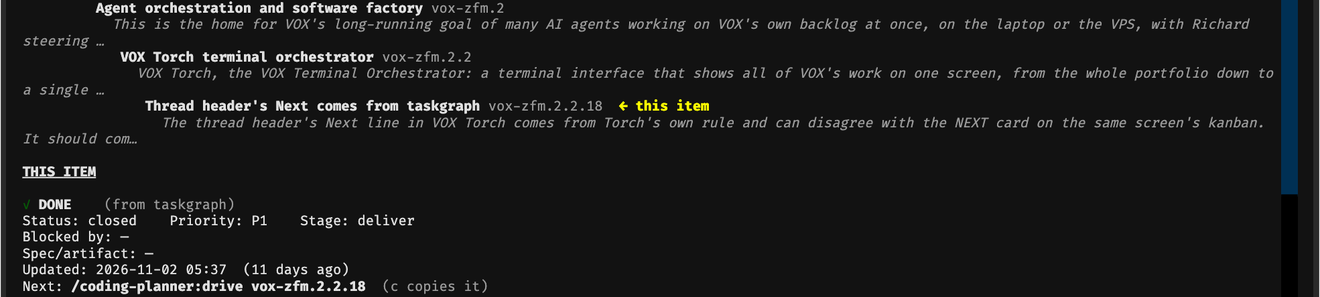
The Item screen opens on the chain of intent from the top of the task tree down to the item, so whoever approves a step can see what it is for, then the item's own state, blockers and the command that moves it on (c copies it).
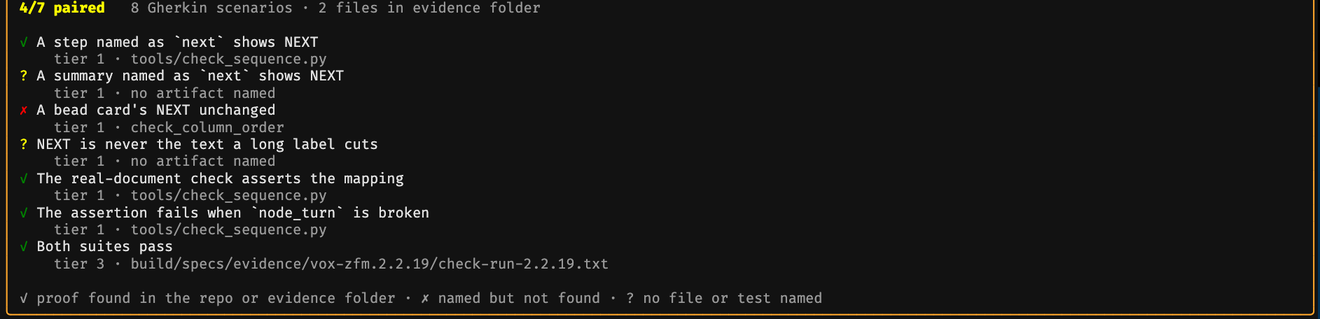
Further down, the evidence box pairs each claim in the item's spec with the proof the spec names, and marks it found, named but missing, or with nothing named. o opens the spec itself.
Needs you cuts across every thread and lists only what waits on a person, with how long it has waited; Enter opens the item. Escape goes back one screen from anywhere.

Agents lists the Claude Code and tmux sessions running on the machine, with each one's state. For this picture the list was limited to the sessions working on the lab's tooling.

How it works
Torch is written in Python with Textual, a framework for terminal applications, and packaged with uv. It reads Beads through the bd command, asks Taskgraph for its account of each thread, and reads Claude Code's local session registry. Taskgraph is our tool that works out, for a branch of the task graph, what is finished, what is in flight, what comes next in what order, and where work waits for a person; it prints that as versioned JSON. Torch asks it once per thread at load, all threads at once, so the kanban and the turns come from one snapshot.
The figure, shared with the Taskgraph page, shows where Torch reads from beside the other views: Beads directly, Taskgraph's JSON for order and status, and the session records for its Agents screen.
Torch stores nothing. It is a view plus, later, actions that write back through Beads and through the commands of our coding pipeline, the route every code change takes (spec, test-first build, second-model review, a person's merge). Beads has no field for whose turn it is, and none is added; the turn is derived each time. Where Taskgraph covers a bead, the turn is Taskgraph's. Where it does not, Torch falls back to its own rules from the bead's status, its open blocking dependencies and its pipeline metadata, and marks each such value with ~ so the reader knows it is an inference. Work that Taskgraph says is in progress but that nobody has touched for more than three days shows as stalled.
Two rendering rules apply everywhere: an empty screen is not the same as a healthy one, and unavailable data is not the same as no data, so a screen that cannot load says so; and every derived cell names its basis.
The Item screen carries what we call holding intent. It shows the chain from the root of the tree down to the task, so a person approving a step sees what the step is for. Each spec's claims are paired with the evidence it names: found, named but missing, or no file or test named. A plain-text dump of the portfolio, needs-you queue and agents is available for logs and tests, and a script renders every screen headless to SVG for checking without a terminal.
Decisions
- One interpretation of order. Torch once worked out its own wave view and a drawn dependency graph. Both were retired in October 2026 in favour of rendering Taskgraph's model, because two derivations of the same facts drift apart. The retired tabs were parked on branches, not deleted.
- tmux owns the agents. Any window tool is only a view onto tmux, so agents stay reachable by hand if the window tool fails.
- Dispatch from a thread's kanban. When launching is built, it happens at a thread's level, with agents overlaid on the work, the number running against a cap, warnings where two tasks touch the same files, and each task's readiness.
- Pipeline runs through the pipeline's own verbs. Torch may start the coding pipeline's headless runner for a chosen list of tasks, with every write going through the pipeline's commands, so it never writes pipeline state directly. This is decided and not yet built.
What exists today
Torch is a working read-only prototype that we use on our own work against live data, in a private repository with checks for navigation and the kanban that run against fixtures. Not built: launching agents, messaging agents, sessions on other machines, and any write to Beads. The Queue screen is designed. Launching agents also waits on a decision about our agent model: whether workers keep a persistent role or start fresh for each step.
Referenced by 11
- ProjectsVOX OS: personal AI operating system architecturelinks here in its text
- ProjectsVox Canvas: a browser task graph viewerlinks here in its text
- Projectsgc-torch: a terminal view for Gas Citylinks here in its text
- ProjectsTaskgraph: a status map for coding agent worklinks here in its text
- ProjectsAI software factory: coding agents with gateslinks here in its text
- ConceptsThe future of work with AI agentslinks here in its text
- ConceptsThe Loop: how AR Labs workslinks here in its text
- ConceptsThe AI interface architectlinks here in its text
- ConceptsVOX: voice in, concepts outlinks here in its text
- ConceptsThe intelligence is in the orderinglinks here in its text
- OperationsMonitoring multiple AI agent sessions from one screenlists this as related