Under constructionStatus: Building. Being built now. Parts may run; the whole is not finished.
Every project’s status →01.13Agent fleet view
Goal Map / Agent Orchestrator: AI agent sessions around the month's goal
AR Labs' Goal Map / Agent Orchestrator places every project on a spiral around the month's goal, with the AI agent sessions working on each in orbit.
The Goal Map / Agent Orchestrator, or goal map for short, is an interactive page, built by AR Labs, that shows what we are pursuing this month and which AI agents (language models run in a loop with tools, so they can act as well as reply) are working on it. Every project sits on a spiral around the month's goal, in priority order, and the agent sessions working on each project orbit it as moons. A person can see at a glance which priorities have no agent, which work has drifted outside the priorities, and what is waiting on them, then jump from the map to the terminal tab where an agent is running. It is part of VOX OS, our design for an operating layer over agent work. This page covers the project and where it is going; the goal map skill page describes how a map is generated and refreshed, and AI agent operations dashboards and goal maps covers how the map sits among the other views we plan with.
Of the orchestration its name describes, the map does two things today: it shows running and recent agent sessions against the priority each serves, with what each is working on and waiting for, and it brings a running agent's terminal tab to the front. It does not start, stop, resume or instruct an agent. Reopening a closed conversation from the map, and a supervised pilot of closing an idle agent and returning to it later, are being built (see What exists today below). Assigning work to agents is outside its plan: the map reads the records of the tools that dispatch work, such as our coding pipeline, and does not become one of them. The agents it shows are listed on AI agents at AR Labs.
What the picture says
The form of the map carries its meaning, so each element is a claim.
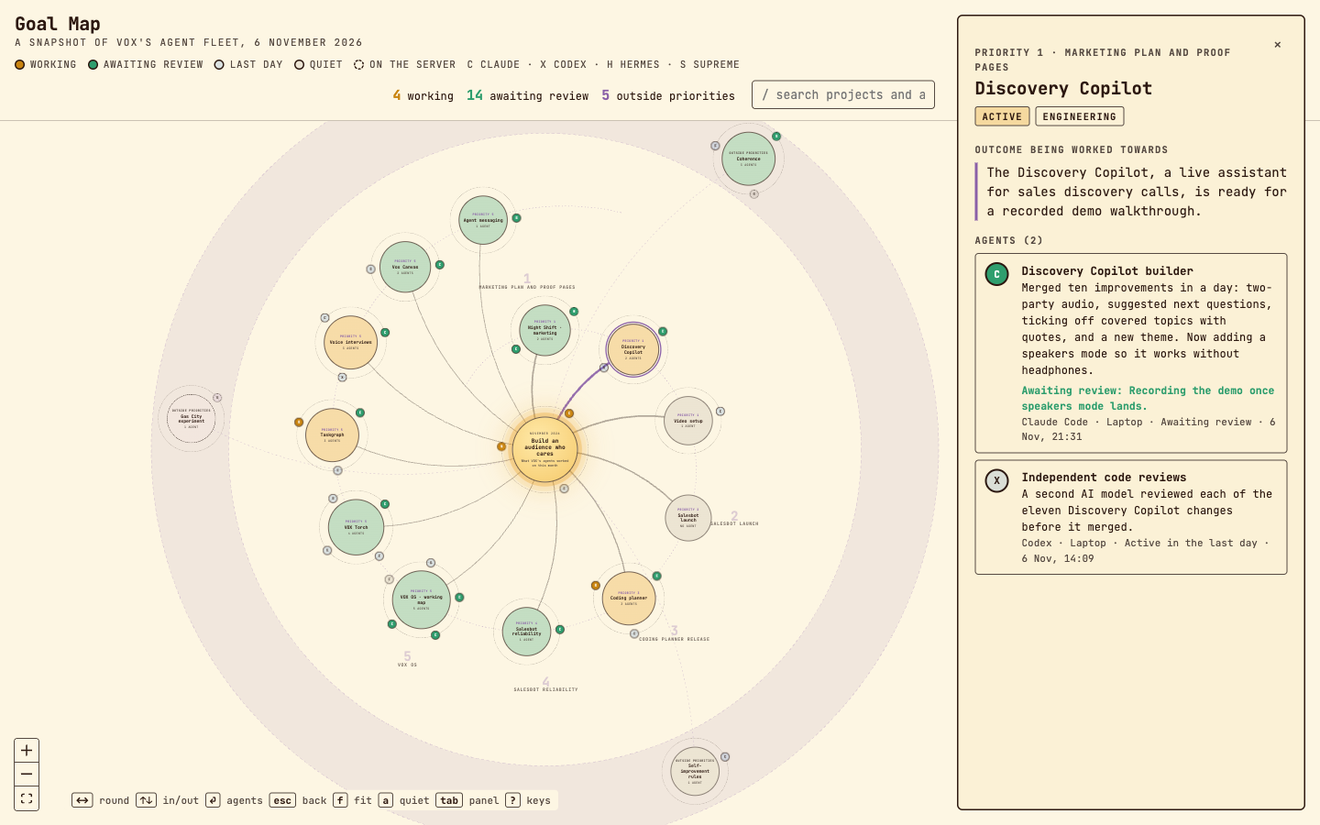
- The sun is the month's goal. The strategy project, which coordinates the others, orbits it rather than sitting on the spiral.
- The spiral carries every project that serves a numbered priority, nearest the sun first. Distance from the centre reads as distance from the month's goal.
- The belt, a dashed band outside the spiral, holds projects that serve no priority. Work there is drift by construction.
- Planet colour is the project's status, in the same phase colours our Taskgraph maps use: working, waiting on a person, idle, parked.
- Moons are agents, lettered by kind (Claude Code, Codex, Hermes and others) and dashed when they run on a server rather than the laptop. A moon pulses when its process was alive and recently active, and fades with age measured against the viewer's clock, so a map opened days later shows nothing as current.
Zooming changes detail: far out shows names and agent counts, closer shows each project's outcome, closest shows agent labels. The map is driven from the keyboard: arrow keys walk the spiral, Enter steps into a project's agents, / searches projects and agents, and a key brings the selected agent's terminal tab to the front. Nodes cannot be dragged, because positions are computed and a dragged planet would misstate its priority.
How it works
flowchart LR
  SW["Sweep agent"]
  J["Sweep JSON"]
  FR["Month's goal and priorities"]
  BU["Build script and validator"]
  PG["Map page"]
  H["Local tab helper"]
  TT["Terminal tab"]
  FR --> BU
  SW --> J --> BU --> PG
  PG -->|"locate, focus"| H --> TT
A refresh starts with a background agent that sweeps the running and recent sessions of Claude Code, Codex and our resident agents, and writes what each is working on and what it waits for. The session that ordered the sweep reviews it against what it already knows: every priority appears even when empty, nothing reported as failing is shown as active, and every agent shown before is still present, marked not running if the sweep missed it. A build script validates the data and refuses what the page cannot show, and a check script renders the page in light and dark themes for a visual check before the result is committed.
The diagram above is the goal map's own refresh. The figure below, shared with the Taskgraph page, places it among our other views of the work, and shows the one difference that matters: VOX Torch, Vox Canvas and Taskgraph's own map all read the task graph, while the goal map reads only the sweep of agent sessions. It shows which agents work on which priority, not where each task stands.
The page is a single HTML file using React Flow 12, loaded through an import map with no build step, so it opens from disk or any static server.
Going to an agent's tab is exact, never guessed. A static page cannot reach the terminal, so a small helper serves the page on the local machine and answers two requests: which agents have a live tab, and bring this one forward. A Claude Code session is matched from its session id, through Claude Code's own session record, to a process and the terminal device that hosts it. A Codex conversation is matched through the conversation file a running Codex process keeps open, whose name carries the conversation's id. A saved process id or a matching window title is accepted only when no other candidate claims it. Each answer is running, stopped, conflict or unknown, and when two tabs share a title the helper reports both instead of guessing. The helper refuses requests from another origin and passes only a device path or tab position to the terminal's scripting interface.
The same sweep can build a public edition: a dated snapshot in which every project and agent description is rewritten for an outside reader, with identifiers and private names removed, and with the tab helper and session references stripped out. The build refuses any shown agent that has no public description. One edition is published: the goal map as it stood on 6 November 2026, which a visitor can pan, search and open in the same way.
What exists today
The map, the sweep, the build and check scripts and the tab helper are built and used on our own work, with tests covering the helper's identity rules. A dated public snapshot, from 6 November 2026, is published at /goal-map. The next stage is being built, and none of its four milestones is complete yet. Its aim is for the map to become the way back into any conversation, so that idle agent processes can be closed without losing track of where the work lives:
- a durable catalogue of every conversation the map has shown, kept after the process closes, with names, project and history across tools;
- clear names and running, closed or unknown state on each moon, and the ability to rewind the map to an earlier refresh;
- one action to focus a running conversation or reopen the exact saved one in the right workspace, never a different or new conversation as a fallback;
- a supervised pilot of closing an idle agent and returning to it later.
An assessment of reuse found that our browser canvas, Vox Canvas, had implemented and tested only the listing of running Claude Code sessions, so the first release keeps discovery and the catalogue as standard-library Python modules beside the helper, written so the canvas or the terminal interface can adopt them later.
Referenced by 09
- ProjectsVOX OS: personal AI operating system architecturelinks here in its text
- ProjectsVox Canvas: a browser task graph viewerlists this as related
- ProjectsTaskgraph: a status map for coding agent worklinks here in its text
- ProjectsAI agents at AR Labs: the agents we run and what each doeslinks here in its text
- ProjectsResident AI agents: a multi-agent system with roleslists this as related
- SkillsGoal map: Claude Code skill to map AI agents onto goalslinks here in its text
- SkillsPaper-and-ink theme: Claude Code skill for design tokenslinks here in its text
- OperationsAI agent operations dashboards and goal mapslinks here in its text
- OperationsMonitoring multiple AI agent sessions from one screenlists this as related